
Your admin account never clocks out. It keeps its privileges around the clock – and that is exactly the biggest problem. In this article, we show you how to administer with admin accounts that hold no permissions at all.
Sound familiar?
You close your laptop at 5:30 pm. Your admin account doesn’t. It stays fully privileged – on every server you manage. All night. All weekend. During your holidays, while you’re lying on the beach.
Now for the uncomfortable question: who is using your privileges during that time? Hopefully no one. But „hopefully“ is not a security strategy.
The 97 percent truth
Take a single server from your estate. Any one. Let’s say the application server you patched this week.
How much time did you actually spend working on that exact machine this week? Installed the updates on Tuesday, restarted a service on Thursday, checked a log in between. All in all: maybe 5.5 hours.
A week, however, has 168 hours. And your admin account was privileged on that server in every single one of them.
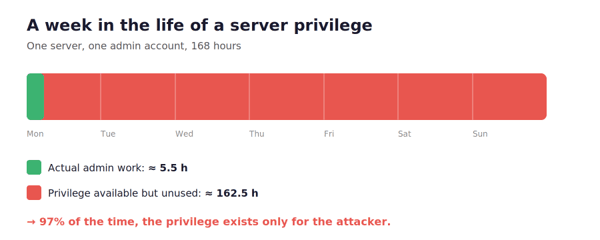
That leaves a good 162 hours in which the privilege exists even though it isn’t actually needed. That’s 97% of the time – and during that time, the privilege has exactly one audience: attackers.
And now for the unpleasant part: that was one server. Multiply that by every server in your environment. One open door becomes a wheel of Swiss cheese – holes everywhere.
The numbers prove that attackers target exactly this: according to the Verizon DBIR 2025, stolen credentials were the most common entry point for breaches at 22%, and the IBM Cost of a Data Breach Report 2025 shows that such incidents take an average of 246 days to identify and contain. Eight months in which someone is moving around with someone else’s privileges.
The idea that changes everything
What if your admin account simply held no permissions?
No membership in privileged groups. No rights on the servers. Nothing. An attacker who captures the credentials – through phishing, an infostealer, or some leak – is holding a key that fits no lock.
That is exactly what Zero Standing Privileges (ZSP) means: permissions exist only when they are actually needed. Afterwards, they are gone again. Not disabled, not hidden – gone.
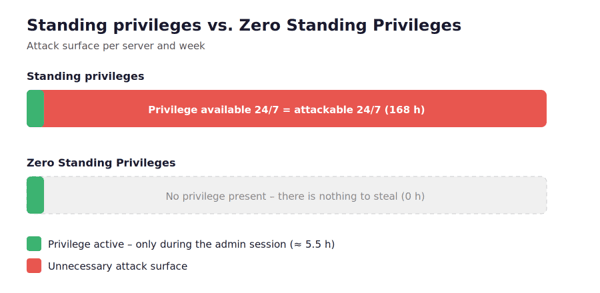
What doesn’t exist can’t be stolen.
"Sounds like bureaucracy hell"
I can already hear the objection: „Great, so now I have to open a ticket and wait for three approvals before every server access?“
No. And this is where it gets really good.
With BeyondTrust Privileged Remote Access (PRA) and Entitle, the admin starts the session in the PAM solution as usual – with a double-click. In that same moment, the account is automatically granted its permissions on the target system. When the session ends, the permissions are revoked again within seconds.
Double-click. Work. Done. You notice: nothing. No ticket, no waiting, no forms. Security happens fully automatically – you simply enjoy the comfort of a modern PAM solution while being better protected than ever before. ❤️
PAM with ZSP completely reverses the logic of permissions: the default state of an admin account is zero rights. It is granted permissions only when access is established through the PAM solution – and only on the exact server or cloud resource being accessed. Everything else stays off-limits. And if the environment ever goes down? That’s what break-glass access is for – access to your systems is guaranteed at all times.
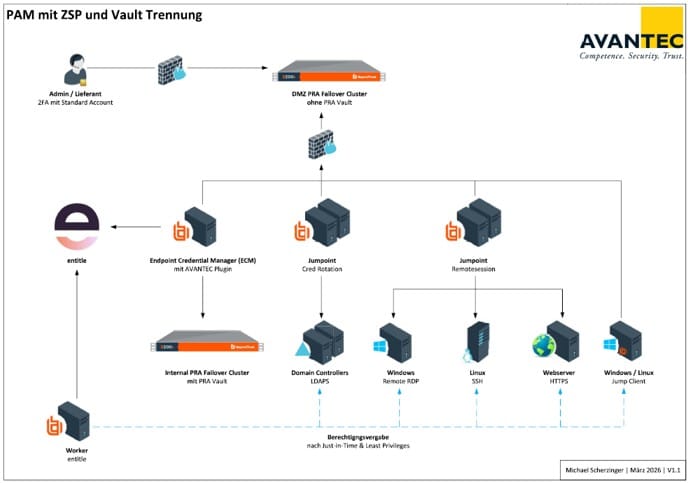
A quick look at the architecture: the PRA is the central entry point for all administrative sessions – internal and external. Our AVANTEC plugin connects the PRA with Entitle. Entitle in turn uses a worker to control permission assignment directly on the target systems – just-in-time and following least privilege, on-premise (Windows & Linux) as well as in the cloud.
Conclusion
Classic PAM manages administrative access. ZSP goes one decisive step further and abolishes standing privileges altogether. The attack surface shrinks to a minimum – the admin notices nothing in their day-to-day work, while attackers notice all the more.
And now, back to the question from the beginning: who is working with your accounts after you clock out?